For mid-sized manufacturers and distributors
Can you make management decisions for the AI era with your current core system?
From a legacy core system to a flexible, extensible IT platform.
We move core systems and business tools running on AS/400, NEC ACOS or Microsoft Access to a modern web system while keeping today's specifications, and support you on to AI agents and data use (AX).
Is one of these coming up?
- End of maintenance or lease
- Retirement or transfer of the people who can fix it
- EDI over INS Net (announced to end on December 31, 2028)
See how pressing your deadlines are and how hard a migration would be, in about 3 minutes
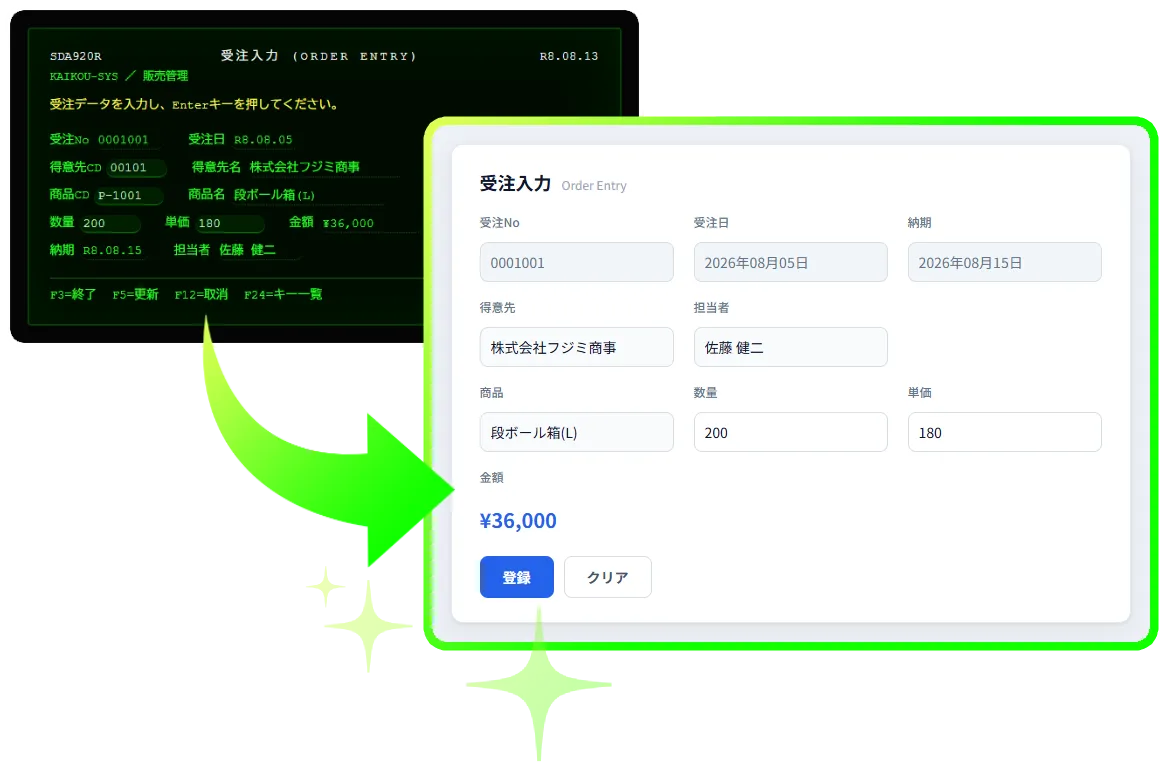
From core system migration to AX, in one service
We move legacy core systems such as AS/400 to a modern web system with AI-assisted analysis and development, then add AI agents to turn it into a platform that puts management data to work.
Phase 1
Current-system survey
Analyze the current system with AI and visualize its specifications
Phase 2
Migration
Keep the current specifications and migrate step by step
Phase 3
AX
Extend features with AI agents and put data to use
Migration is not the goal but the starting point of AX.
Does this sound familiar?
People, things, money and information: all of them are tied to the legacy core system
Behind these concerns lie four challenges: people, things, money and information.
Today“Only one or two people in the company can fix the RPG or COBOL”
People
A core system that depends on a few people
Years of person-dependent changes have turned the specifications into a black box, and fewer engineers can work on it every year, raising the risk to business continuity.
What AX migration aims for
- A user-friendly web system the next generation can work with
- Reduce the risk to business continuity
Today“Every new customer or product means a slow round of changes”
Agility
A system that cannot keep up with the market
Every time you try to respond to new customers or market changes, the limits of the existing system hold back new products and services.
What AX migration aims for
- Make it easier to add features in short cycles
- A system that adapts more easily to market changes
Today“Maintenance costs keep rising and leave no budget for new investment”
Cost
"Life-extension costs" that limit growth
The more maintenance and additions to the current system cost, the less budget is left for new challenges that drive the business forward.
What AX migration aims for
- Keep the initial investment low with a phased approach
- Turn the maintenance budget into growth investment
Today“The figures for management meetings are collected by hand in Excel every month”
Data
Data you cannot use for decisions
Core data stored on AS/400 and similar systems is often locked in proprietary formats, so the figures behind management decisions are not available in real time.
What AX migration aims for
- Aim to prepare data in real time with AI agents
- Get the information needed for proactive decisions
If any of these sound familiar, start by checking how urgent a renewal is with the free web check (about 3 minutes).
Start the free web checkYou know a renewal is needed, but cost, time and the impact on daily work hold you back.
We answer these concerns with three strengths.
Three features of AX migration
Visualize with AI, verify by comparison, and go on to AX.
We combine AI-assisted analysis and development with experience in core system migration, and proceed step by step.
If time is the concern
Visualize the current specifications with AI
AI analysis* of the current system makes visualizing the specifications more efficient
AI-assisted development aims to shorten the time it takes to move to a modern web system
If the impact on operations is the concern
Run the same data through old and new and compare
A migration that keeps the current specifications and makes use of existing assets
The same data runs before and after the migration and the results are compared, to check that the business logic is carried over correctly
If the cost is the concern
Proceed step by step, on to AX
Agree on the method and schedule after Phase 1, then move on
You do not have to order the whole project at once. After the migration, AI agents aim to put management data to use.
* Specifications, source code and other materials you entrust to us are processed in a secure environment where they are not used as training data.
Demo
Compare an order entry screen before and after the migration
Using an order entry screen as the example, switch on the spot between a screen that recreates the look of the current system (AS/400) and a modern web screen as it could look after the migration.
See the demo(opens in a new tab)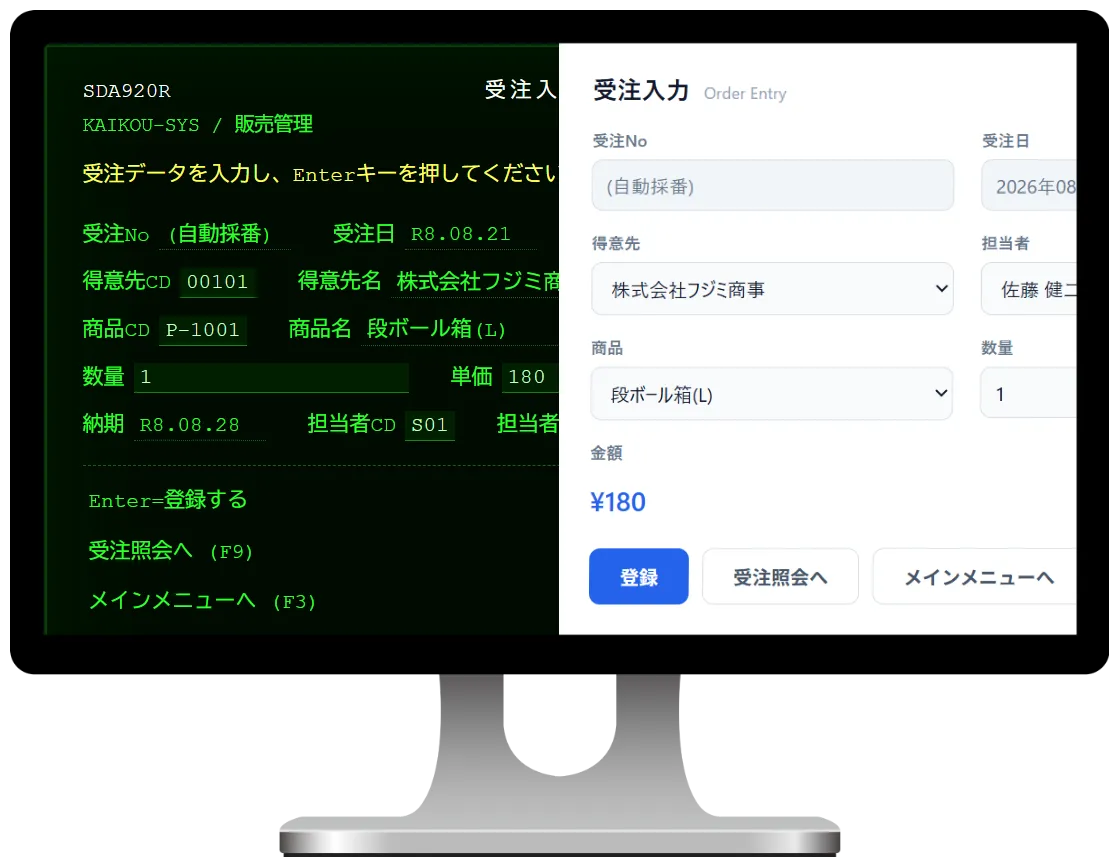
How we proceed to AX
A phased approach (survey, migration, extension) keeps risk and investment low. After the migration, AI agents analyze the system and its data to help streamline operations, and further features build a foundation that adapts more easily to change and supports growth.
At the end of Phase 1, we agree on the migration method and schedule with you before moving on.
First
Free web check (about 3 minutes)
Answer multiple-choice questions to see the migration difficulty, the urgency of a renewal and the challenge to tackle first right away.
Next
Free consultation
Based on your result, we explain how to proceed and what to check next.
Then
Quick assessment (asset inventory by our staff)
An inventory of your assets (number of programs, languages, integrations) gives an estimate of the migration difficulty.
Phase 1
Current-system survey
- Analyze the current source code, forms and data structures to visualize the specifications
- Sort out integrations with other systems, unused features and duplicate processing
- Agree on the migration method and schedule with you, then move to Phase 2
Phase 2
Migration
- Convert existing assets to the new platform while keeping the current specifications
- Run the same data before and after the migration and compare screens, forms and results
- Move step by step to a modern web system that fits your needs
Phase 3
AX
- Analyze current issues and data, and prioritize the features to extend with AI agents
- Develop the highest-priority features first and release them step by step
- Work toward the next-generation business transformation you aim for
Talk to us about how to proceed
Besides the free web check, we take questions by phone and email.
- Phone
- 03-5427-3663
Department: DX Services Division,
Hours: weekdays 9:30-18:00 (JST)
Systems we migrate
Not only core systems: business tools used by a single department are covered too.
AS/400 (IBM i)
Core systems written in RPG, COBOL or CL, moved to the web together with their screens, forms and data.
NEC ACOS
COBOL assets on ACOS-2 or ACOS-4, including online screens, batch jobs and forms.
Microsoft Access
Department Access tools brought together in a web system that many people can use safely.
After Access 2016 and 2019, Microsoft support for Access 2021 also ended on October 13, 2026 (Microsoft 365 is not affected).
Start the free web diagnosis with the Access questionsSee the three ways for Access in detail (fix, move to the web, replace)Others
Visual Basic client-server systems, low-code products such as WebPerformer, and other office computers and mainframes.
For mid-sized manufacturers and distributors.
Migrating from AS/400 (IBM i)
What can prompt a migration, and what to check before one.
End of support or leaseCheck when support for the server, OS or product, or the lease, ends. IBM standard support for IBM i 7.3 and 7.4 has ended; only paid extended support remains.
Who can change itCheck whether only one or two people in-house can change the RPG, COBOL or CL programs, and whether they will retire or move within a few years.
EDI over phone linesCheck whether old EDI over INS Net (JCA or Zengin protocols) is still in use. NTT East and West have announced that INS Net will end on December 31, 2028.
Screens, forms, data and linksList the 5250 screens and printed forms, printing on special forms and handheld terminals, the data staff pull out with Query or Excel transfers, and the exchanges with other systems and partners.
Migrating from NEC ACOS
What can prompt a migration, and what to check before one.
End of support or leaseCheck when support for the ACOS-2 or ACOS-4 machine or products, or the lease, ends. Notices from the maintenance company or the lease contract will tell you.
Who can change itCheck whether only one or two people in-house can change the COBOL programs and the job procedures (JCL), and whether they will retire or move within a few years.
EDI over phone linesCheck whether old EDI over INS Net (JCA or Zengin protocols) is still in use. NTT East and West have announced that INS Net will end on December 31, 2028.
Screens, forms, data and linksList the business screens (opened with ETOS and so on) and printed forms, the overnight and month-end jobs, how the data is stored (ADBS, RIQS II, files), the character codes (JIPS) and custom characters, and the exchanges with other systems and partners.
From closing it off to deciding how to protect it
A web system does not have to be open to the internet
A web system is one you use in a browser. Where it can be reached from is decided separately from how it is built.
Today
Used only inside the company
It is usually used from dedicated terminals or the company network.
One possible setup after the move
Used only from the company network
As today, it can be reached only from the company network. The screens open in a browser.
One possible setup after the move
Also used from outside (home or other sites)
Only people who pass sign-in with a company account and a second check of who they are (multi-factor authentication) reach the system.
Which setup to use is decided with you, after we hear your company's rules.
Four things to decide when moving to the web
We decide how to protect it together with how to build it.
Where it can be reached from
Only from the company network, or from outside as well.
How people sign in
Whether to use company accounts and multi-factor authentication.
Permissions, records and backups
Who may do what, what is recorded and how to restore.
Who keeps fixing it when a weakness is found, and how
We who build it also provide the upkeep to keep fixing it. We decide with you how much you leave to us.
For IT departments: we explain where it can be reached from, sign-in, permissions, records, backups and how it is fixed after the move, along the items your review checks.
You can also talk about how to protect it in the free individual consultation.
Why you can rely on us
Security
Specifications, source code and other materials you entrust to us are processed in a secure environment where they are not used as training data.
Scope
Besides AS/400 (IBM i), NEC ACOS and Microsoft Access, we also take on Visual Basic systems and other office computers and mainframes.
DX-certified company
Software Agency System Co., Ltd. is certified under the DX Certification program of the Ministry of Economy, Trade and Industry.
PrivacyMark
Software Agency System Co., Ltd. holds the PrivacyMark (certification number 10822550, conforming to JIS Q 15001:2023).
ISMS (ISO/IEC 27001)
Design and development of AX migration carried out at our head office are within the scope of our ISMS certification (certificate number IS609954): business system development at the head office.
After the move
We who build it also provide the upkeep to keep fixing weaknesses when they are found.
Start with the free web check
Choose the system you want to migrate and answer multiple-choice questions. You will see the migration difficulty, the urgency and the challenge to tackle first. At the end, enter your company and contact details to see the result right away (you can also print it or save it as a PDF). No pushy sales.
- Multiple choice, about 3 minutes
- Migration difficulty
- Priority challenge
STEP 1 / 6Which system are you thinking of migrating?
Choose the one that applies to go to the next question.
FAQ
Does the free web check cost anything?
No. A consultation about the result is free as well.
Can I answer if I am not in IT?
Yes. All questions are multiple choice and you can choose "I don't know". Detailed questions are optional.
Which systems are covered?
AS/400 (IBM i), NEC ACOS and Microsoft Access. Please also ask about Visual Basic systems, low-code products such as WebPerformer, and other office computers and mainframes.
Is it secure to move a system we used only inside the company to the web?
That is a fair concern. A web system also carries a risk: when a weakness (vulnerability) is found in software it uses, that weakness can be exploited until it is fixed. So when we decide how to migrate, we decide with you where the system can be reached from (only on your internal network, or from outside the office as well), how people sign in, and how permissions, records and backups are managed. After the move, we who build it also provide the upkeep to keep fixing weaknesses when they are found; how much you leave to us is discussed with the approach. Note also that once maintenance of the OS or a product ends, weaknesses found in it are no longer fixed, and this applies to your current system too.
Can we move to the web without making it usable from outside?
A setup used only from the company network is also possible. Where it can be reached from is decided after we hear your company's rules.
Can you explain things for our IT department's review?
Yes. We ask what your review checks (where it can be reached from, sign-in, permissions, records, backups, how it is fixed after the move and so on) and explain along those items. Engineers join when needed.
How much does it cost and how long does it take?
It depends greatly on the number of programs, screens and forms, and on the integrations, so it is settled in the current-system survey (Phase 1). The free web check and the consultation cost nothing.
Can we start with some operations or systems only?
Yes. We agree on the method and schedule with you in Phase 1 and migrate step by step. You do not have to order the whole project at once.
Is there anything to prepare before the consultation?
You can consult us without it. It helps to have the maintenance and lease contracts, a rough count of programs, screens and forms, and a list of the connected systems and business partners.
Our maintenance vendor holds the source code. Can we still consult you?
Yes. First, we check with you whether the source code held by your maintenance vendor or supplier can be provided for the survey (contract and cost).
How can I use the result?
You see the migration difficulty, the urgency and the priority challenge right away. Use them in your internal discussion. The exact approach, schedule and cost are set in the current-system survey.
What does "AX" mean?
AI transformation: business transformation that makes use of AI. After the migration, AI agents are added to the new web system to analyze the system and its data, streamline operations and extend features step by step.
Are the specifications and source code we provide used to train AI?
No. Specifications, source code and other materials you entrust to us are processed in a secure environment where they are not used as training data.
Can we consult you if the system holds personal data?
Yes. We first ask what kind of data it holds and decide with you how the data is handled.
How is my information used?
Only to follow up on your result and to contact you about AX Migration.
Make your next step a step toward AX.
Start with the free web check to see how pressing your deadlines are and how hard a migration would be. You can also reach us by phone or email.
Multiple choice, about 3 minutes
- Phone
- 03-5427-3663
Department: DX Services Division,
Hours: weekdays 9:30-18:00 (JST)